Highlight to Calendar
A Chrome extension that turns highlighted text into a Google Calendar event.
How it works
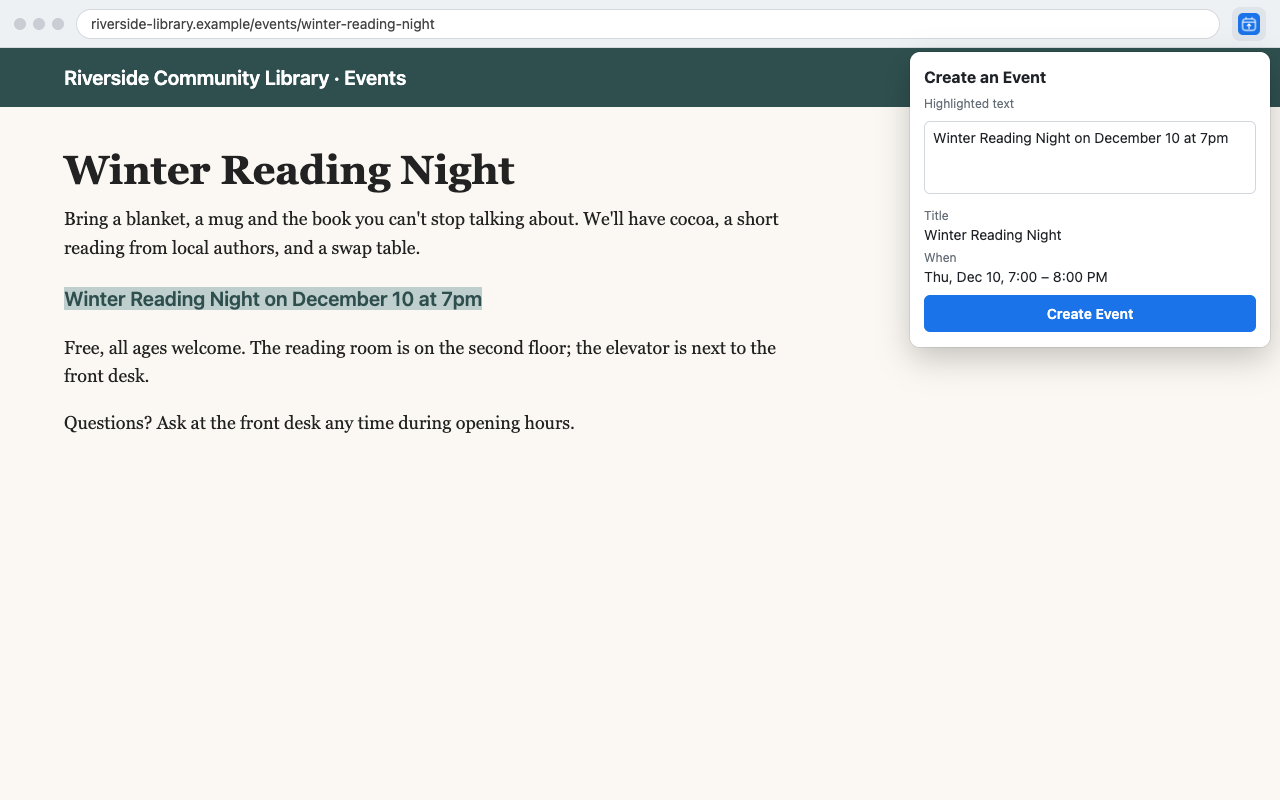
- Highlight text that contains a date or time on any web page.
- Click the extension's toolbar icon. The popup shows the event it found, with a short title.
- Click Create Event. Google Calendar opens with the event filled in, ready for you to review and save.
Support
Questions, bugs, or a date that parsed wrong? Email support@blackwood.io.
If you're reporting a bad parse, it helps to include the exact text you highlighted and what you expected the event to be. Please leave out anything private; I only need enough to reproduce it.
Privacy policy
Effective November 19, 2026
Short version: the extension does not collect, store, or send your data to me or anyone else on its own.
- What it reads. When you click the toolbar icon, the extension reads the text you currently have selected on the page you're viewing, and works out the event from it. This happens entirely on your device.
- What leaves your device. Nothing, until you click Create Event. That opens Google Calendar in a new tab, and the event's title, description, and time, built from the text you selected, are included in the address. From there, Google handles it under Google's privacy policy.
- What I collect. Nothing. There are no accounts, analytics, tracking, advertising, or cookies, and the extension loads no remote code. I never receive the text you select.
- What it stores. Nothing. The current version doesn't save anything on your device.
Why it asks for the permissions it does.
activeTab: to read the selection on the tab you're using when you open the popup.- A script on web pages (
httpandhttps): so the extension can read your selection on whichever page you're on. It only responds when the popup asks for the selection, and it only returns the selected text.
Changes. If this ever changes, for example if optional paid features store a license key on your device, I will update this page before that version is released and change the date above.
Contact. support@blackwood.io